



We’re in the age of artificial intelligence, which means everywhere you look, someone is trying to automate something: factory work, writing, accounting … you name it.
We could probably argue over just how beneficial automation really is to a lot of these tasks (or humans in general), but there are a few situations where I’m happy to let a machine take the wheel. Among them? I say let the robots automate your savings.
If you think about it, we’ve already been automating several of our personal finance tasks for years. Direct deposit automatically sends your paychecks into a bank account. Autopay automatically tackles your monthly expenses for you (and saves a stamp).
So why not add a savings plan to your list of automated financial tasks?
If you save like most people save, you log in to your bank’s website, then manually transfer money between your savings and checking accounts. That’s fine … if you remember to do it, or if you don’t decide you’d rather keep that money in checking to spring for Taylor Swift tickets.
Creating an automatic savings plan, however, means never forgetting, nor never making an excuse not to save. Think of it like putting your money on cruise control—when you automate your savings, you’re saving at the exact speed you want to right now, which makes it all the likelier that you’ll save enough money to reach your financial goals on time.
If you’re ready to sit back, relax, and let the robots do the saving for you, read on. I’ll discuss eight ways you can automate your savings, then answer a few related questions our readers have asked about both automated savings plans and saving in general.
Featured Financial Products
What Are Automated Savings?

Automated savings are savings that happen passively—that is, without you having to do something every time you want to save. By either setting up automations through a traditional financial institution (if they allow for them) or using an automatic savings app, you can save in a set-it-and-forget-it fashion. That means no more mentally keeping tabs on what portion of money in your checking account you’re actually saving. And it means no more summoning the willpower to transfer money to savings each month.
Should You Automate Your Savings?
Yes. While it’s still important to check in on your progress, putting your savings on autopilot makes it substantially easier to reach your savings goals. Using an automated savings plan saves you time and mental energy. It also ensures that saving money becomes a priority—not just an afterthought.
What Is an Automated Savings Plan?
An automated savings plan is a personal savings system in which a predetermined sum of money is automatically transferred into a savings account or similar financial vehicle. The transfers typically are made on a recurring basis, at a time and frequently that makes sense for you—usually monthly or every paycheck.
Developing an automatic savings plan is an excellent way to achieve your savings goals. From a behavioral science standpoint, automatic transfers take far less self-discipline than you need to make regular manual money transfers. It saves you time, and it saves you mental energy.
Better still: Setting up an automatic savings plan is pretty simple. Just check out our eight steps below.
Do you want to get serious about saving and planning for retirement? Sign up for Retire With Riley, Young and the Invested’s free retirement planning newsletter.
How to Automate Your Savings
1. Set Up Direct Deposits in Your Savings Account or Savings App
Most people have their employers direct-deposit their paychecks into their checking accounts. It makes sense—you need to pay your bills, after all, and you’ll typically do that from your checking account.
However, you can choose to have a portion of your paycheck directly deposited into your savings account, too. Many employers let you choose how much you want to direct toward checking, and how much you want directed toward savings.
This system can also be useful for spouses who have both separate accounts and a joint account. Each spouse can send some money to their own checking accounts as well as money to a joint savings account.
Related: 50+ Best Money-Making Apps That Pay You Real Money
2. Set Up Automatic Sweep Transfers
Another way to put your savings on autopilot is to use a sweep account—a bank or brokerage account that invests excess savings into investments that earn interest.
With a sweep account, you set a dollar amount—say, $2,000—and at the end of the day, if your funds exceed that amount, any overage is swept into some sort of investment option, usually a money market fund. You’ll still have quick access to that money whenever you need it, but until then, it’s earning interest for you.
Note: While setting up a sweep account is easy, it might involve paying fees.
Many brokerage accounts will actually sweep idle cash into their money market funds so you’re still earning interest even if you don’t have all of your funds invested.
Related: 9 Best Stock Portfolio Tracking Apps [Stock Portfolio Trackers]
3. Pay Yourself First
Paying yourself first is more of a mentality than anything else. The idea with paying yourself first is, rather than putting together a budget and deciding “I have a little bit left at the end for savings,” you should budget with saving in mind. Saving should be part of your budget. You should set aside money for your savings goals right away before purchasing luxuries. This is especially true if you don’t have a fully funded emergency fund. An emergency fund can prevent you from going into debt if a crisis occurs.
Just because you have savings as part of your budget doesn’t mean you can’t save more than you initially planned. If you get a bonus at work or have another financial windfall, you can always save more.
Related: How to Get Free Money Now [15 Ways to Earn Money]
4. Leverage Microsavings Apps
Some people use microsavings apps—apps that help you save a little bit at a time in various ways—to help grow their savings faster.
For instance, a microsavings app might round up the price of a purchase to the nearest dollar, then store the “spare change” in a savings account or some other type of savings “bucket.” Microsavings apps also offer features such as cash-back rewards, interest earned on deposits, savings matches, and more.
These automatic savings apps are great because they don’t just make it easier to save—they accelerate how fast you’re able to save, typically with no extra effort.
Acorns (Invest Simply With Pre-Built ETF Portfolios)

- Available: Sign up here
- Best for: Investors looking for simple, automated investing
- Platforms: Web, mobile app (Apple iOS, Android)
Acorns is a micro-investing app geared toward minors, young adults, and millennials that’s perhaps best-known for its “Round-Ups” program.
With Acorns Round-Ups, the app rounds up purchases made on linked debit and credit cards to the nearest dollar, investing the difference on your behalf. For example, if you purchase a coffee for $2.60 on a linked credit card, Acorns automatically rounds this charge up to $3.00 and puts the 40-cent difference aside. Once those Round-Ups reach at least $5, they can be transferred to your Acorns account to be invested.
The Acorns investment offering itself is a simple, automated platform that uses pre-built portfolios of ETFs to keep investors exposed to stocks and bonds. While it doesn’t have much to offer intermediate investors who want variety in their portfolios, Acorns’ basic approach makes it one of the best investment apps for beginners.
Here’s more about what you can expect from Acorns’ varying subscription options:
- Acorns Bronze ($3 per month): Includes an Acorns Invest investment account, as well as Acorns Later for tax-advantaged investment options such as Roth IRAs. Also includes Acorns Checking, a bank account that has no account fees, lets you withdraw fee-free from more than 55,000 ATMs nationwide, and Smart Deposit, which allows you to automatically invest a bit of each paycheck into your Acorns accounts.
- Acorns Silver ($6 per month): Everything in Bronze (Acorns Invest, Later, and Checking), plus Premium Education, which are live onboarding sessions covering account setup, Round-Ups, setting up recurring investments, and more; Emergency Fund; and a 25% bonus on Acorns Earn rewards (up to $200 per month).
- Acorns Gold ($12 per month): Everything in Silver plus Acorns Early, which allows you to open a custodial investment account for your child so you can begin investing for them while they’re a minor; custom portfolios that allow you to hold individual stocks; live Q&As with financial experts; a 50% match on Acorns Earn rewards (up to $200 per month); $10,000 in life insurance; even the ability to set up a will for free.
Silver and Gold subscribers also get access to a powerful way to accelerate their savings: Later Match. While most people are aware that employers will sometimes match funds you contribute to your 401(k), “matches” are rare in retirement accounts like IRAs, where there’s no employer to kick in extra cash. However, Acorns itself will match 1% or 3% on new contributions to IRAs for Silver and Gold subscribers, respectively.
Learn more in our Acorns review, or use our link to sign up with Acorns today.
- Acorns allows you to sign up for investment, retirement, and checking accounts for you and your family, learn how to earn more money, and grow your investing knowledge.
- Famous for investing spare change automatically through Round-Ups, this all-in-one financial app helps younger generations start investing earlier.
- Invest in expert-built portfolios made up of diversified ETFs.
- Silver tier includes perks such as a 25% match on Acorns Earn rewards (up to $200/mo.), generous APYs on Checking and Emergency Fund, and live Q&As with investing experts.
- Gold tier includes perks such as a 50% match on Acorns Earn rewards (up to $200/mo.), $10,000 in life insurance, and picking individual stocks for your portfolio.
- Gold also comes with a free Acorns Early account for up to four children. It's also the only tier to offer Acorns Early Invest: a UGMA/UTMA custodial account where you can save toward your kids' future and get a 1% match on up to $7,000 in contributions annually.
- Earn even more with Later Match: Acorns will match up to 1% (Silver) or 3% (Gold) of all new IRA contributions in your first year.*
- Special offer: Get a free $20 bonus investment when you sign up with our link and start making recurring investments.**
- Robo-advisor with affordable fees (on larger portfolios)
- Fixed fee model
- Round-ups
- FDIC/SIPC insurance
- IRA match (Personal Plus and Premium)
- High fixed fees for small balances
- Limited investment selections
- Must subscribe to Premium for any self-directed investing options

Related: The 13 Best Investment Apps for Beginners
5. Set Up Recurring Transfers Into a Savings or Investment Account
One really easy way to save automatically is to set up recurring transfers from a checking account into a savings account, savings app, or investment account. For example, you might choose to have $1,000 transferred from your checking account to your savings account on the 15th of every month.
Recurring transfers—almost always free to set up, by the way—can be managed from your bank’s website or app, and they will typically continue every month until you cancel the action.
Featured Financial Products
Related: 10 Best Stock Advisor Websites & Services to Seize Alpha
6. Create Goals In Your Savings App
Many people aren’t just saving for saving’s sake—they’re working toward some sort of goal: a car down payment, a honeymoon, their child’s education. And having a goal can provide the kind of motivation you need to regularly save.
Some savings apps take this to the next level, allowing you to actually save toward multiple specific goals. So rather than just funding a single savings account, you can have one savings bucket for your car down payment, another for a high-priced concert ticket, and another for a summer vacation, for instance.
You can set both short- and long-term goals. For instance, you might set aside some money for a trip you have planned in a month, while you might aside other money for your retirement savings plan (on top of what you’re paying into your employer-sponsored plan).
Also, make your goals realistic and specific. Don’t tell yourself you’re going to save 95% of your income—that’s not realistic. And don’t just say “I’m going to save money.” Choose deadlines and dollar amounts whenever possible.
Do you want to get serious about saving and planning for retirement? Sign up for Retire With Riley, Young and the Invested’s free retirement planning newsletter.
Related: 15 Best Investment Apps and Platforms [Free + Paid]
7. Track Your Progress Using Net Worth Trackers
While an automatic savings plan is … well, automatic … you can’t literally set it and forget it. You need to periodically check in on how you’re progressing.
Thing is, every bank account, investment, credit card bill, etc., shows just a portion of your financial situation. So, sure, you can look at your savings account and see “I’m following through with my plan,” but ideally, you want a big-picture look at all of your finances to see whether you’re on track to reach all of your financial goals.
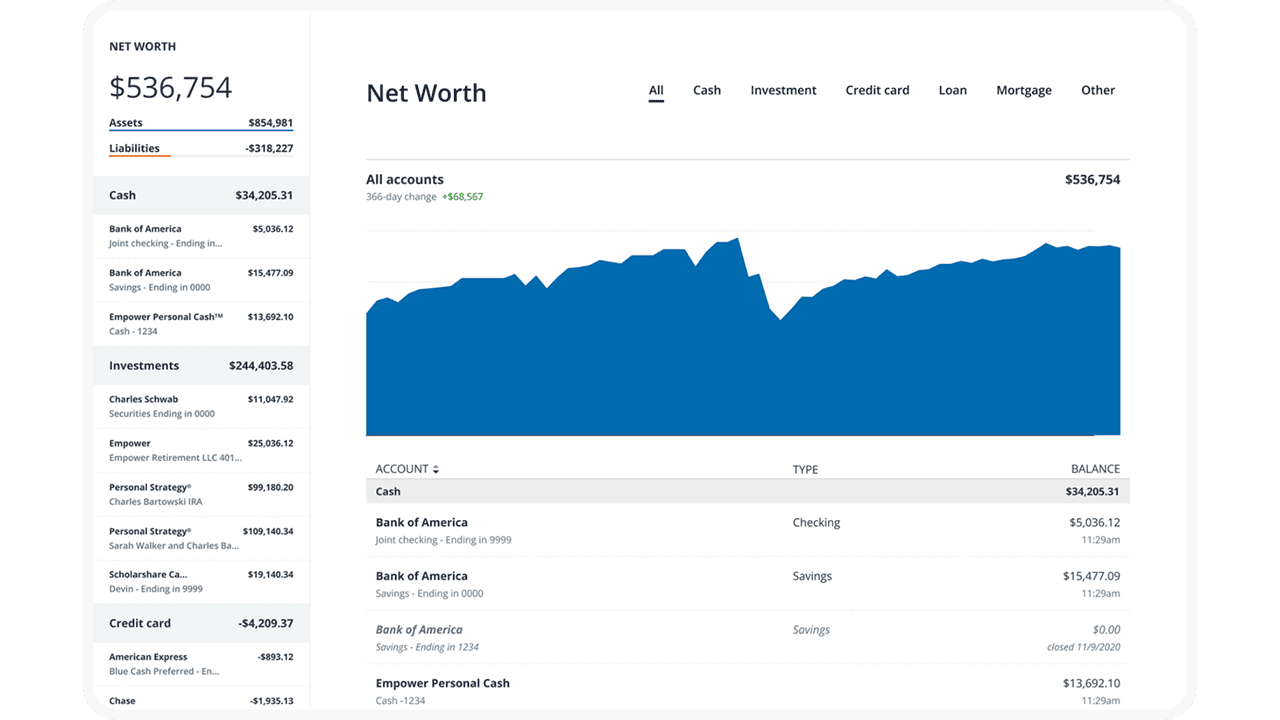
That’s where a net worth tracker comes in. Wealth/net worth trackers link to all of your accounts, then provides that collective information via a single dashboard.
Track your net worth with Empower
- Available: Sign up here
- Platforms: Web, mobile app (iOS, Android)
Empower is one of our top-rated financial platforms for people of any income level thanks to the quality and breadth of its dual offerings: a suite of free-to-use tools that even the most financially experienced people can put to use, and fee-based investment, wealth management, and private client services available to people with as little as $100,000 in investible assets.
Empower’s free financial planning tools
The free Personal Dashboard makes it easy for people to add all their financial accounts (including credit cards, savings, checking, loans, and tax-advantaged investment accounts) in one place.
Empower offers a number of investing and personal finance tools that you’d expect from a free service, such as the Savings Planner, Retirement Planner, and Financial Calculators—all intuitive and well-built.
But where I think Empower really shines is its free Investment Checkup tool. The tool assesses your portfolio risk, analyzes past performance, and even provides a target allocation for your portfolio. Many people don’t realize how much of their varying mutual funds and ETFs overlap with one another—but the tool can actually help you identify overweight and underweight sector investments (maybe you have too many assets in utilities and not enough in health care) and assess your true diversification.
You can even compare your portfolio to both the S&P 500 and Empower’s “Smart Weighting” Recommendation, which suggests that investors more equally weight their portfolios across size, style, and sector—unlike the S&P 500, where the biggest stocks have the most effect on the portfolio, and there are huge differences in how much each sector is weighted.
Another exceedingly useful tool is the Empower Fee Analyzer, which examines the fees you pay across all the various funds you hold, whether that’s advisory fees, sales charges, annual expenses, or other costs.
Empower’s wealth management services
Empower’s full-service Personal Strategy and Private Client accounts better suit investors who want a fuller advisory experience. Empower offers three tiers based on your investible assets:
- Personal Strategy Investment Services ($100,000-$250,000): This tier includes unlimited financial advice and retirement planning guidance from Empower’s advisory team. You’ll have a professionally managed portfolio of ETFs that can be reviewed upon request. And it also comes with Empower’s state-of-the-art digital tools.
- Personal Strategy Wealth Management ($250,000-$1 million): This tier provides you with two dedicated financial advisors providing advice and planning. You’ll have a fully customized portfolio of both stocks and ETFs, which allows for more flexibility and better tax optimization, and your portfolio will be reviewed regularly. You’ll also have access to specialists in real estate, stock options, and other areas.
- Private Client ($1 million or more): This tier also provides access to a pair of dedicated financial advisors, but it also gives you Priority access to Empower’s specialists and the investment committee. You’ll also receive in-depth specialist support for retirement and wealth planning, and you’ll also be able to invest in private equity should you wish.
Use our exclusive link to sign up with Empower, whether that’s for the free tools or the advisory services. No matter how much (or how little) money you bring to the table, you’ll be given the option to schedule a free initial 30-minute financial consultation with an Empower advisor.
- Empower offers both a free set of portfolio, net worth, and cash flow tracking tools, as well as paid asset management service.
- Link Empower to your bank and investing accounts, credit cards, and more to see a single view of useful information and data, including your net worth.
- Empower Advisory Group offers a comprehensive wealth management service known as Personal Strategy. This managed account solution provides clients with discretionary investment management, personalized portfolio construction, and access to financial planning support. Accounts investing $100k to $250k receive unlimited advice and retirement planning help from financial advisors, as well as a professionally managed ETF portfolio with reviews upon request. Higher asset tiers offer access to dedicated advisors, estate planning, and tax specialists, plus additional investment options like access to private equity.**
- Special offer: If you have $100k+ in investible assets, sign up with our link to schedule a free initial 30-minute financial consultation with an Empower professional.
- Free portfolio tracker (Dashboard)
- Free net worth, cash flow, and investment reporting tools (Dashboard)
- Tax-loss harvesting (Personal Strategy)
- Dividend reinvestment (Personal Strategy)
- Automatic rebalancing (Personal Strategy)
- Low investment expense ratios (Personal Strategy)
- High number of investment accounts supported (Personal Strategy)
- High $100k minimum for investment management (Personal Strategy)
- Moderately high investment management fee (0.89% AUM) compared to other online advisors (Personal Strategy)

Related: 15 Best Investing Research & Stock Analysis Websites
8. Adjust Your Savings Rate as Needed to Hit Your Goals
Maybe you’ve discovered that you’re not saving enough to meet your current goals. Or maybe your goals have shifted and require you to put more money away. Either way, saving isn’t static—throughout your life, you’ll need to adjust your savings rate.
Here’s a common for-instance: You set a savings goal for a house down payment and give yourself five years to hit that goal. When you’re close to the end of those five years, you discover that home prices have gone up and are now much more on average. You need to make a decision—start putting a lot more away immediately, or push back your savings timetable.
By the way, sometimes there are welcome reasons to change your savings plan. Let’s say you receive a big raise at work—you might find you now have more financial room to save, and you’re able to speed up your savings timetable.
Featured Financial Products
Related: How to Invest Money: 5 Steps to Start Investing w/Little Money
What Are the Benefits of Creating an Automatic Savings Plan?
The primary benefit of creating an automatic savings plan is pretty straightforward: It can help you save more money, which puts you in a better financial situation. It also saves you time—you don’t have to manually transfer money every month.
But you shouldn’t ignore the mental benefits of automatic savings, either. Money that never enters your checking account is money you don’t miss as much. You’ll also worry less about whether you’re saving enough, or about not having a concrete plan in place.
In short: The benefits are more money, more time, and less stress.
Is There An App That Automatically Saves Money?
Yes, several apps can automatically save you money. Specifically, microsavings apps are an increasingly popular way to save money.
Microsavings apps provide a wide range of services that help you automate (and even accelerate) your savings. This includes:
- Round-ups (Rounding up purchases and putting the excess cash into savings)
- Automatically setting aside money into separate savings accounts
- Earning you high yields/interest rates
- Cash-back rewards
- Helping you create a budget
As you can see, the most common threads among microsavings apps is making saving easier, and helping you save every time you spend.
Make Young and the Invested your preferred news source on Google
Simply go to your preferences page and select the ✓ box for Young and the Invested. Once you’ve made this update, you’ll see Young and the Invested show up more often in Google’s “Top Stories” feed, as well as in a dedicated “From Your Sources” section on Google’s search results page.
Can You Set Up Automatic Transfers From Checking to Savings?
Yes. It’s usually simple to set up transfers from a checking account to a savings account. Simply log into your financial institution’s online portal, navigate to where you typically make transfers, and see if they have recurring transfers in addition to the normal one-time transfer option. If they do, choose the dollar amount and frequency. And remember: You can stop automatic transfers at any time.
Should I Use Automatic Savings?
Automatic savings plans are a smart idea for most people. As long as you can afford to set money aside in a savings account or other savings-specific “bucket,” and you’re realistic about how much you can save, an automatic savings plan is likely a good fit for you.
Even just automating a small part of your savings, whether it be through direct deposit, transfers, or an app, can create a positive savings habit.
Where Should I Keep My Savings?
All of your savings don’t need to be held in a traditional savings account. While a savings account will earn you interest, it’s still much less than you could be earning elsewhere. There are several savings account alternatives that might be a better fit for your money.
High-yield savings accounts, money market accounts, Treasuries, and certificates of deposit (CDs) are all examples of other safe financial vehicles that can earn you more money than a standard savings account. When choosing where to store your savings, consider interest rates, liquidity, your risk tolerance, and whether your money would be insured.
Featured Financial Products
Related: