



A budget is the foundation of your financial health. Want to know if you can afford a vacation? How much you can save for retirement? How you can pay off your mortgage faster? These questions can all be answered if you have a budget.
And one of the most popular ways to create your own budget is building a budget spreadsheet in Microsoft Excel.
This article will explain how to make a budget in Excel in 10 simple, easy-to-understand steps. And to help get you started, we’ll even include a free budget spreadsheet template in Excel.
Budgeting Apps to Consider—Top Picks
|
Net Worth & Cash Flow Tracking

|
Digital Envelope Budgeting System

|
See All Your Accounts in One Place

|
|
Primary Rating:
4.7
|
Primary Rating:
4.6
|
Primary Rating:
4.5
|
|
Get the app for free—attach your accounts and build your net worth picture
|
Free 34-day trial, then $14.99/mo or $98.99/yr
|
Starts at $41.88/year
|
What Is a Budget?
What is a budget? A budget is a listing of your actual income and the amount you can afford to spend on your expenses and put into savings.
Income typically includes your wages, though it can also include things such as investment returns.
Expenses include every dollar you spend, from housing costs and income taxes to food and fun stuff like vacations, sporting events, and going out for a nice dinner and drinks.
You’ll also want to include line items in your budget for different types of saving: emergencies, specific large purchases, and long-term/retirement.
To be clear: The budgeting process is to your financial health what cleaning your bathroom is to your physical health. Most people don’t find creating and sticking to a budget to be a lot of fun.
But the longer you put it off, the harder it is to do. And if you don’t do it regularly, you can end up with a problem that’s really difficult to overcome.
However, if you make a budget and review it regularly, you’ll make better financial decisions and have more confidence in your finances. You will be less likely to run up more debt than you can afford to repay. And you’ll be more likely to be able to retire in the fashion you desire.
Do you want to get serious about saving and planning for retirement? Sign up for Retire With Riley, Young and the Invested’s free retirement planning newsletter.
How to Create a Budget Spreadsheet in Excel
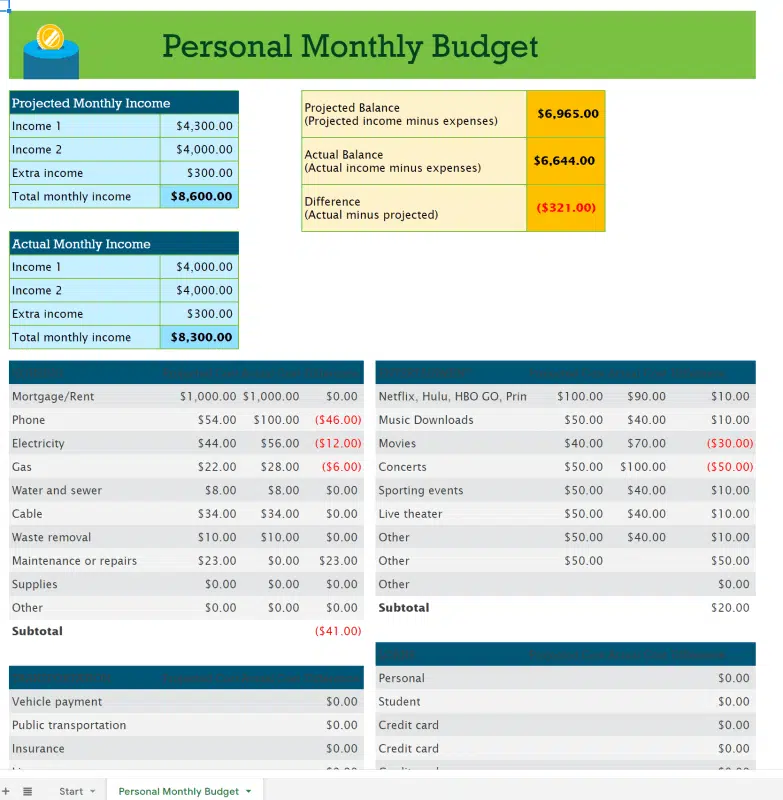
To make this easier on you, we have created a free budget template. You can sign up in the box below and quickly receive the budget template in your inbox.
Use it to follow along with the steps outlined below to make sure you are learning how to create a budget in Excel that works for you.
As an overview, here are the steps necessary to create a budget in Excel:
1. Identify Your Financial Goals
In my case, my primary financial goal is to make sure I enjoy my retirement. Your goal might be the same. But other popular goals include saving for down payments on houses, refinancing student loans, affording college for your children, and funding retirement.
2. Determine Your Budget Period
The most common time periods for a budget are monthly and annually. If you budget for a month, it is critical to remember to add expenses that you don’t pay every month. That’s because you’ll need to set aside money in short-term savings so you have the money when those expenses become due.
3. Calculate Your Total Income
Figure out how much Form W-2 or Form 1099 income you’re going to earn during your budgeting period (1099 vs. W-2 can result in different tax situations).
4. Begin Creating Your Excel Budget
Build a personal budget worksheet for tracking your expenses. You can use a host of budget templates, but we suggest using the free Excel budget template provided above.
5. Enter All Cash, Debit and Check Transactions Into the Budget Spreadsheet
Enter all of the checks, debit card, and cash transactions from your checkbook or online bank account into the Excel spreadsheet. Identify the types of expenses.
6. Enter All Credit Transactions
Enter all of the transactions on your credit cards into the same Excel spreadsheet, identifying the types of expenses. (Important note: Don’t double-count the credit card payments from your checkbook with the details of the expenses from your credit card bills.)
7. Calculate Total Expenses From All Sources
Add up all of the expenses in Steps 5 and 6 by type of expense. Apart, they tell you where you’ve been spending money; together, they show you how much you’ve spent in total.
8. Run a Comparison of Income to Expenses
Compare your expense budget to your income. If your projected expenses and target savings exceed your budgeted income, you need to figure out how to get more income (take a second job or, in my case, take on a consulting assignment in my retirement?).
Of course, most people can’t just create income out of thin air, so the other option is to cut expenses.
Do you want to get serious about saving and planning for retirement? Sign up for Retire With Riley, Young and the Invested’s free retirement planning newsletter.
9. Identify Areas for Expense Reduction
Make a first pass at the expense part of your budget by looking at how much you’ve spent. Review to see if there are any expenses you can reduce. You likely won’t find many opportunities for savings with utilities and other vital bills like for cell-phone service—maybe you can be a little more energy-conscious or pick a slightly cheaper phone plan. Typically, people find more savings on “discretionary” spending (think wants, not needs) like going to restaurants or frivolous shopping.
Occasionally, harder decisions have to be made. It might be downsizing to a smaller home, going from two cars to one.
10. Be Diligent With Your Budget
Monitor your actual expenses to make sure you are not overspending your budget.
Do I Need a Budget Spreadsheet? I’m Already Saving Some Money.

If you have been working for several years and are able to put money in savings, you might wonder why you need to create a budget. The biggest reason to make a budget at this stage of your life is to make sure you are putting enough money into savings.
I think of savings in three components:
Emergency Savings
Emergency savings is money that will cover either your living expenses if you find yourself without an income, facing a medical emergency, or needing to cover travel expenses because of the death of a close family member. Most people recommend that you target three to six months of basic living expenses for your emergency savings.
- It is critical to distinguish between what is an emergency and what is not. For example, a funeral is an emergency; a wedding is not.
- If you want to be able to go to someone’s wedding, the costs should already be in your budget or come from savings specifically designated for attending weddings.
Designated Savings
Designated savings is money to fund large purchases you want to make in the future. Think of creating designated savings as budgeting over several years.
- You will need to replace your car every so often. You might have a few “dream” vacations you’d like to take. Maybe you want to make a down payment on a condo vs. apartment-renting or to fund your children’s education.
- Unless you make so much money that you can fit the full cost of these items in one year’s budget, you’ll need to fund them over several years.
Long-Term or Retirement Savings
Long-term or retirement savings is money that allows you to live when you are no longer working.
By creating a budget that includes all three components of savings, you’ll be more confident that you will have the cash flow to tackle your monthly expenses, but also be able to navigate emergencies and still realize your dreams.
The amounts you need to include in your budget for emergency and designated savings are pretty straightforward. Determine how much you need and the date by which you want to have those amounts available and do the arithmetic.
Retirement savings, however, might be a little more complicated.
Do you want to get serious about saving and planning for retirement? Sign up for Retire With Riley, Young and the Invested’s free retirement planning newsletter.
How Much Retirement Savings Should I Budget For?

When you go to figure out how much to budget each year for retirement savings, you have to consider a number of factors:
- How much you’ve already saved.
- How much money you want to spend each year when you retire.
- How much risk you are willing to take with your retirement savings.
- Whether the amounts you set aside are before or after-tax (i.e., in health savings accounts [HSAs], traditional or Roth IRAs and 401(k)s).
- Your current age.
- Your target retirement age.
- How long you expect to live.
- Whether any of your employers provide you with a defined benefit pension plan.
- How much you’ll get from Social Security.
- Expected inflation rates between now and the time you die.
- Tax rates on any non-Roth savings when you retire.
To provide you with some insights on how much to save, I’ve created a very simple example:
- You want to retire at age 60.
- You want to be able to spend an amount equal to 80% of your current after-tax salary, adjusted for future inflation. Federal, state, and Social Security taxes currently total 40% of your salary, so the equivalent percentage of your pre-tax salary is 48%. The math: (Percent of after-tax salary desired * [1 – your total combined rate for federal, state, and Social Security taxes] = equivalent percentage of your pre-tax salary). So here, the math would be (80% * [100% – 40%] = 48%)
- You are willing to take the risk of the overall stock market, so we will assume you average 9% return on your investments.
- Inflation is 4% per year until you die at age 90. Your salary increases with inflation plus 1 percentage point for merit raises and promotions.
- You put all of your retirement savings in Roth accounts, so future taxes aren’t an issue.
- You don’t have any retirement savings yet.
- You don’t have or plan to get money from any defined benefit plans and, for conservatism, I will assume you get nothing from Social Security.
The chart below shows you what percentage of your salary you need to put in a Roth IRA and/or Roth 401(k) to meet these goals based on your current age.
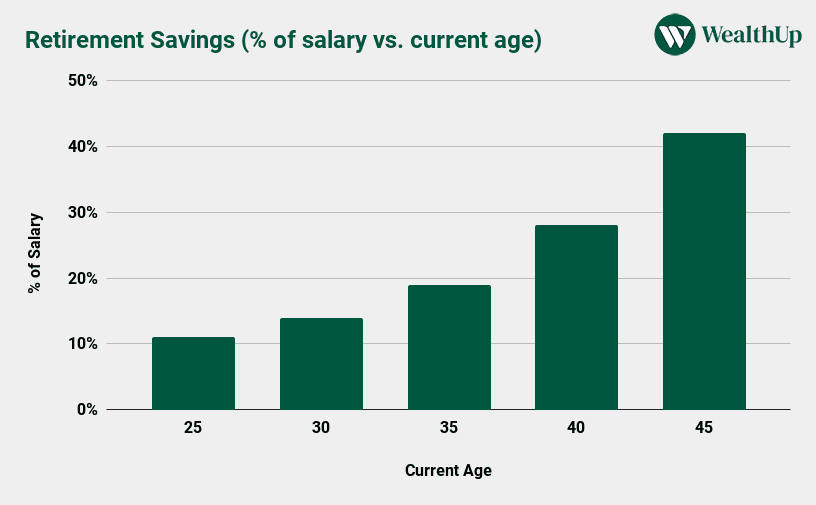
This chart shows that, if you start saving at age 25 under the assumptions above, you need to save “only” 11% of your pre-tax salary in a Roth IRA or 401(k) every year until you retire.
On the other hand, if you are 45, have the characteristics above and use those assumptions, you’ll need to save 42% of your salary every year just for retirement. (But remember: Your employer’s matching 401(k) contributions help reduce the amount you need to contribute.)
All of the values in this chart scale proportionally, so you can increase or reduce the salary percentages if your retirement needs are more or less than are assumed in the illustration.
Also, please note that retirement plan limits have increased for 2024/2025 from 2023. Take advantage of them if you can when creating a budget in Excel and be sure to put as much in your retirement plan as you can afford.
Make Young and the Invested your preferred news source on Google
Simply go to your preferences page and select the ✓ box for Young and the Invested. Once you’ve made this update, you’ll see Young and the Invested show up more often in Google’s “Top Stories” feed, as well as in a dedicated “From Your Sources” section on Google’s search results page.
You Need a Budget
The amounts you need to set aside for emergency, designated, and retirement savings often take up a large percentage of your salary.
That means you need to be disciplined with the remainder to ensure you can meet your current day-to-day needs and realize your long-term dreams.
A budget is a critical tool in helping you maintain that discipline. By tracking your income, expenses, and financial goals across time, you’ll be better able to find additional room for savings in your budget.
But no matter how much (or little) money you make, you can take more control of your financial future by following the steps above and creating a budget in Excel.
Budgeting Apps That Can Help
Budgeting apps can help take you from a simple Excel spreadsheet to a big next step in organizing your finances. Here, we explore three budgeting apps of note:
1. You Need a Budget (the App)

- Available: Sign up here
- Platforms: Web, mobile app (iOS, Android), smart speaker (Alexa)
YNAB (You Need a Budget) is a premier budgeting app that links to your bank(s), determines how much money you have, tracks your monthly income, and helps you determine what your expenses are and when they need to be paid.
YNAB’s features can improve how you spend, save, and plan your finances. For instance, the app tracks fixed expenses and allows you to budget for less frequent variable expenses. It can help you save money by establishing goals. You can also understand your mortgages, student loans, and other debt better—YNAB’s loan calculator shows you how any change to your monthly payments will affect how much interest you owe and how quick you’ll pay off your debt.
And you can put it all together with YNAB’s Net Worth Report, which provides a snapshot of your various account balances.
This is one of the most accessible budgeting apps, too. You can budget at home on your desktop or tablet. If you’re out shopping, you can easily access YNAB via your iPhone or Android smartphone. And if you have a question about your budget but have no free hands, no worries—you can have your Apple Watch or Amazon Echo device talk to you about your finances.
The app’s features aren’t just great on paper—the results are real, too. Surveys conducted by YNAB show that new users saved $600 on average by just their second month.
Try You Need a Budget free for 34 days without entering any credit card information. After that, you can sign up for monthly or annual billing.
- You Need a Budget (YNAB) is an award-winning software platform which uses a proven method to teach you how to manage your money and get ahead.
- Budgets update automatically and in real time, and can be accessed on your computer, phone, or tablet.
- Customizable
- Allows for multiple budgets
- Difficult for beginners
- No bill tracking or bill pay
- No investment tracking features

Related: Best Kids Savings Accounts [Bank Accounts for Kids]
2. Quicken Simplifi
- Available: Sign up here
- Platforms: Web, mobile app (iOS, Android)
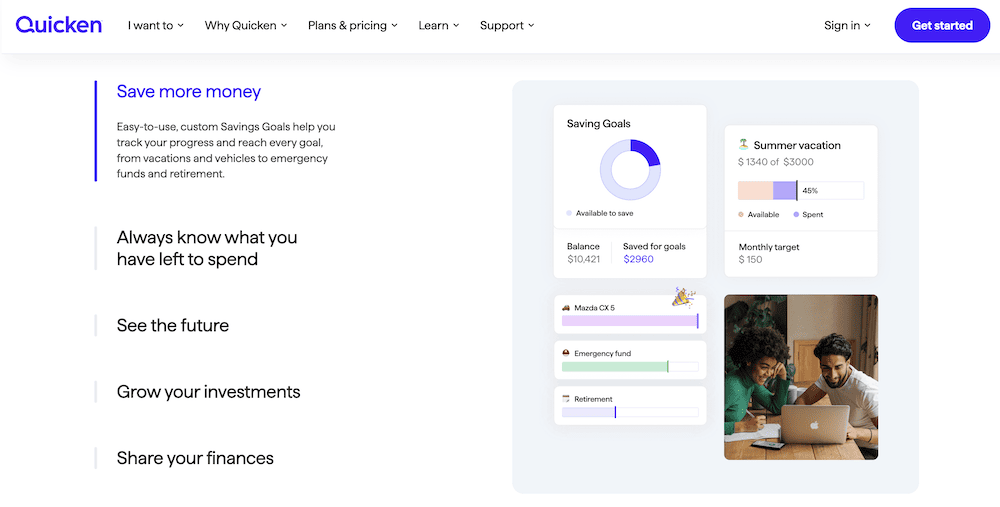
Quicken Simplifi is a useful budgeting app that can help you progress toward your financial goals with confidence.
Simplifi allows you to build monthly budgets yourself, or it will create customized budgets generated automatically based on your income, expenses, and savings. It also provides budget suggestions, and it helps you track progress toward saving goals. The app provides a comprehensive view of your finances, too, syncing up with your bank accounts, credit cards, brokerage and retirement accounts, mortgages, even private investments.
If all of this makes Simplifi seem like a lighter version of Quicken … well that’s because it pretty much is. Quicken literally markets the service right alongside Classic Deluxe, Classic Premier, and Classic Business & Personal, and Simplifi is both cheaper and features fewer options than all three programs.
That said, Simplifi does have a few perks of its own that keep it from truly feeling like “Quicken Lite.” For one, it has a dedicated mobile app—one of my biggest gripes about Quicken is that it only has a “mobile companion app” that syncs up with the desktop versions. Simplifi can also automatically detect bills and identify subscriptions, and, unlike Quicken, it can separate those categories.
Try out Simplifi to see if it’s the budgeting app you need.
- Simplifi allows you to see all your finances in one place by connecting your bank accounts, credit cards, loans, 401(k), and other investments in a single dashboard.
- Save more money and plan better through goal setting.
- Know where your money goes through insight into spending across categories, tracking upcoming bills and building a projected cash flow.
- Get an automatically generated spending plan customizable to your needs.
- Wide range of compatible accounts
- Intuitive dashboard
- Robust budgeting tools
- Savings goals
- Comprehensive, easy-to-read reports
- No free version/free trial
- Savings goals don't link to accounts

Related: Best Prepaid Debit Cards for Kids and Teens
3. Empower
- Available: Sign up here
- Platforms: Web, mobile app (iOS, Android)
Empower is one of our top-rated financial platforms for people of any income level thanks to the quality and breadth of its dual offerings: a suite of free-to-use tools that even the most financially experienced people can put to use, and fee-based investment, wealth management, and private client services available to people with as little as $100,000 in investible assets.
Empower’s free financial planning tools
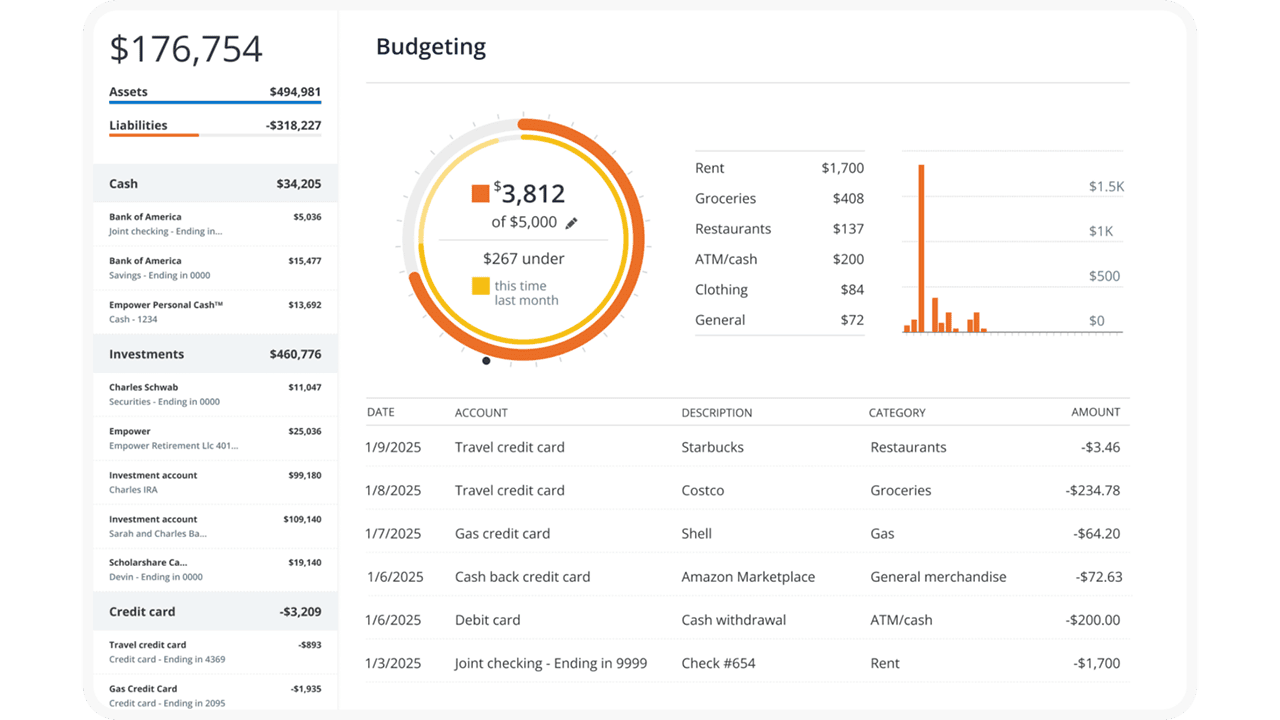
The free Personal Dashboard makes it easy for people to add all their financial accounts (including credit cards, savings, checking, loans, and tax-advantaged investment accounts) in one place.
Empower offers a number of investing and personal finance tools that you’d expect from a free service, such as the Savings Planner, Retirement Planner, and Financial Calculators—all intuitive and well-built.
But where I think Empower really shines is its free Investment Checkup tool. The tool assesses your portfolio risk, analyzes past performance, and even provides a target allocation for your portfolio. Many people don’t realize how much of their varying mutual funds and ETFs overlap with one another—but the tool can actually help you identify overweight and underweight sector investments (maybe you have too many assets in utilities and not enough in health care) and assess your true diversification.
You can even compare your portfolio to both the S&P 500 and Empower’s “Smart Weighting” Recommendation, which suggests that investors more equally weight their portfolios across size, style, and sector—unlike the S&P 500, where the biggest stocks have the most effect on the portfolio, and there are huge differences in how much each sector is weighted.
Another exceedingly useful tool is the Empower Fee Analyzer, which examines the fees you pay across all the various funds you hold, whether that’s advisory fees, sales charges, annual expenses, or other costs.
Empower’s wealth management services
Empower’s full-service Personal Strategy and Private Client accounts better suit investors who want a fuller advisory experience. Empower offers three tiers based on your investible assets:
- Personal Strategy Investment Services ($100,000-$250,000): This tier includes unlimited financial advice and retirement planning guidance from Empower’s advisory team. You’ll have a professionally managed portfolio of ETFs that can be reviewed upon request. And it also comes with Empower’s state-of-the-art digital tools.
- Personal Strategy Wealth Management ($250,000-$1 million): This tier provides you with two dedicated financial advisors providing advice and planning. You’ll have a fully customized portfolio of both stocks and ETFs, which allows for more flexibility and better tax optimization, and your portfolio will be reviewed regularly. You’ll also have access to specialists in real estate, stock options, and other areas.
- Private Client ($1 million or more): This tier also provides access to a pair of dedicated financial advisors, but it also gives you Priority access to Empower’s specialists and the investment committee. You’ll also receive in-depth specialist support for retirement and wealth planning, and you’ll also be able to invest in private equity should you wish.
Use our exclusive link to sign up with Empower, whether that’s for the free tools or the advisory services. No matter how much (or how little) money you bring to the table, you’ll be given the option to schedule a free initial 30-minute financial consultation with an Empower advisor.
- Empower offers both a free set of portfolio, net worth, and cash flow tracking tools, as well as paid asset management service.
- Link Empower to your bank and investing accounts, credit cards, and more to see a single view of useful information and data, including your net worth.
- Empower Advisory Group offers a comprehensive wealth management service known as Personal Strategy. This managed account solution provides clients with discretionary investment management, personalized portfolio construction, and access to financial planning support. Accounts investing $100k to $250k receive unlimited advice and retirement planning help from financial advisors, as well as a professionally managed ETF portfolio with reviews upon request. Higher asset tiers offer access to dedicated advisors, estate planning, and tax specialists, plus additional investment options like access to private equity.**
- Special offer: If you have $100k+ in investible assets, sign up with our link to schedule a free initial 30-minute financial consultation with an Empower professional.
- Free portfolio tracker (Dashboard)
- Free net worth, cash flow, and investment reporting tools (Dashboard)
- Tax-loss harvesting (Personal Strategy)
- Dividend reinvestment (Personal Strategy)
- Automatic rebalancing (Personal Strategy)
- Low investment expense ratios (Personal Strategy)
- High number of investment accounts supported (Personal Strategy)
- High $100k minimum for investment management (Personal Strategy)
- Moderately high investment management fee (0.89% AUM) compared to other online advisors (Personal Strategy)
Do you want to get serious about saving and planning for retirement? Sign up for Retire With Riley, Young and the Invested’s free retirement planning newsletter.
Related: